


Data to Clarity
AI-Enabled AP Invoice Automation for Oracle EBS & Oracle Fusion Cloud
Take supplier invoices from any source, let AI read and check them, and create them directly in Oracle. Your team reviews only the exceptions, and every step is recorded.
Use it with Oracle E-Business Suite, Oracle Fusion Cloud ERP, or both. If you run only one, you get just that part. Available as SaaS, and every invoice gets a confidence score so you know what to trust.
Invoice inbox
Choose a sample invoice, then let the AI read and check it.
Review & approval
A reviewer approves or rejects, and always gives a reason.
Post to Oracle
Approved invoices are created in your ERP.
Illustrative preview with sample data.
Getting invoices into Oracle has always meant a trade-off
Oracle customers with high invoice volumes have had three ways to get invoices into the system. Each has a cost. AI adds a fourth option: an end-to-end process that enters invoices directly into Oracle, with your team handling only the exceptions.
| Manual keying | Custom OCR build | Outsourcing | OneGlobe AI | |
|---|---|---|---|---|
| Who does the work | Your AP staff key every invoice | IT builds and maintains the tool | A third party handles invoices for you | AI reads and enters. Your team reviews exceptions |
| The catch | Costly and slow as volumes grow | Still needs a high degree of manual work | You depend on someone else's process and timing | Anything uncertain is held for a person, never guessed |
| Visibility | Limited to what staff record | Depends on what was built | Reports from the provider | Every step recorded in one audit trail |
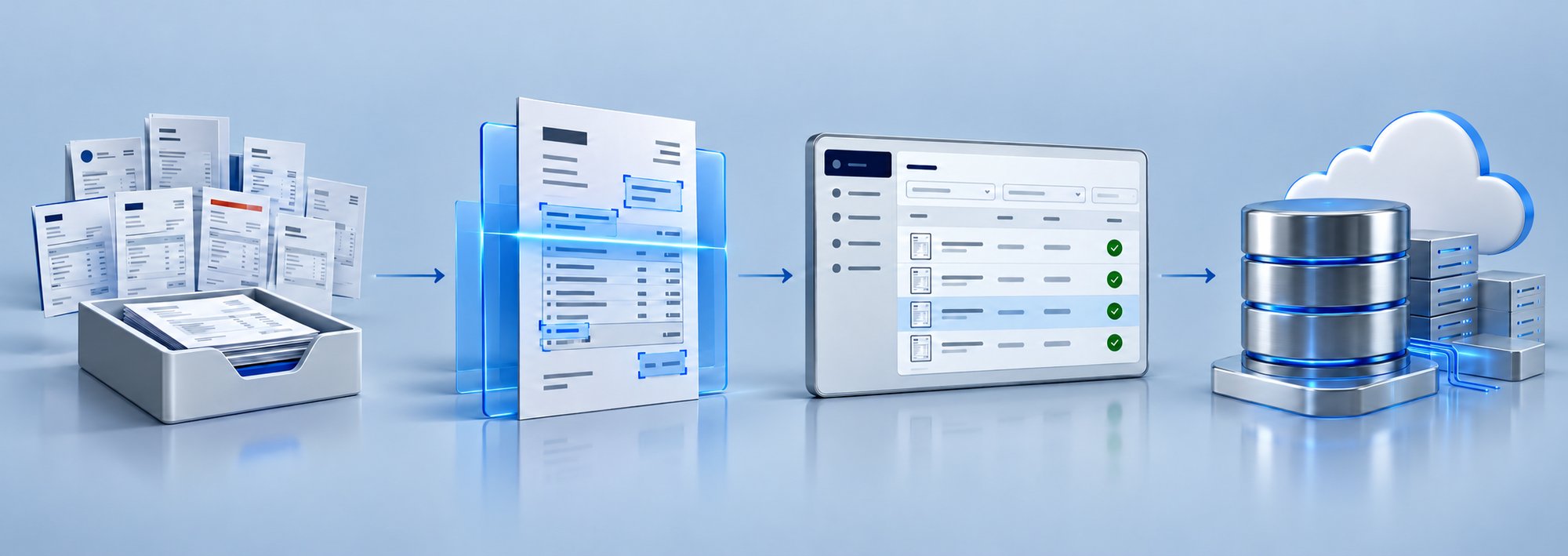
From inbox to Oracle in five steps
Capture
Invoices arrive by upload, email or SFTP folder, from any supplier.
Read
AI reads the supplier, number, dates, amounts and every line.
Check
Each invoice is scored and checked against your ERP and your rules.
Approve
Clean invoices wait for a reviewer. Exceptions go to a person to fix first.
Post
Approved invoices are created in Oracle EBS or Fusion, with a full audit trail.
Start with the Oracle system you run
You do not need both. AP Invoice Automation is available for Oracle EBS on its own, Oracle Fusion Cloud on its own, or both together. You see and set up only what applies to you.
Running E-Business Suite
Invoices are created in Oracle EBS through a small agent in your network. Your dashboard, aging and vendors show EBS only.
Running Fusion Cloud ERP
Invoices are created in your Fusion instance with the original PDF attached, and Fusion runs its own validation. Your dashboard shows Fusion only.
Running EBS and Fusion
Choose the target when you upload, and switch the dashboard between Both, EBS and Fusion. Useful while you move from EBS to the cloud.
Every invoice is scored and checked before anyone approves it
You see not just a score, but why. If AI is unsure, the invoice is held for a person. Nothing is guessed, and nothing is posted with a blocking error.
- Supplier match. Different spellings of one supplier are recognised as one.
- Duplicates. Reformatted invoice numbers are caught, such as ABC-26-08117 and ABC-26-08-117.
- PO and goods receipt matching. Invoices are matched to your purchase orders.
- Totals and tax. Lines must add up to the printed total, and tax must match the printed rate.
- Dates and memos. Credit memos without a due date take it from the supplier site, so they can post.
Example: a suspected duplicate
- Confidence score
- 58% (Low). The invoice is read well, but a check failed, so the score drops and the invoice is held.
- What affected it
- 1 blocking error: the same supplier and amount were already processed under a similar invoice number.
- What happens next
- Status is Needs Review. It cannot be posted until a person resolves or rejects it, and the decision is recorded.
Illustrative example with sample data.
What you get
Every invoice source
Upload files, connect a mailbox (Microsoft 365, IMAP or Exchange) or pull from an SFTP folder. Only real invoice files are picked up. Logos, icons and unrelated attachments are ignored.
Multi-invoice files
One PDF with many invoices is split automatically. Each invoice is created once and followed through, with goods-received notes kept with the right invoice.
Fast, accurate reading
Reads supplier, invoice number, dates, currency, amounts and every line, including long descriptions. Descriptions in Spanish, French, German, Portuguese or Italian are translated to English, and the original is kept in the audit trail.
Confidence score with reasons
Every invoice is scored, and you can open the score to see what affected it. Low-confidence invoices go to a person.
Smart checks
Supplier, duplicate, PO, goods receipt, totals and tax checks run on every invoice, so errors are found before they reach Oracle.
Learns from corrections
When your team corrects something, such as a supplier's usual terms, the solution remembers it, so the next invoice is cleaner.
Approval workflow
Set who approves, amount limits and matching tolerances. Reviewers approve, reject or ask for information, always with a reason, and can decide several invoices at once.
One-click posting to Oracle
Post to Oracle EBS or Oracle Fusion. An invoice can be posted only once, and invoices with blocking errors are stopped. If posting fails, the reason is shown and the invoice returns to review.
Live dashboard for EBS and Fusion
Choose Both, Oracle EBS or Oracle Fusion. Payables aging is read live from your ERP, and spelling variants of one supplier count as one vendor.
Complete audit trail
Every action, by every person, is recorded and can be exported. Auditors get a read-only role.
A workspace your AP team will want to use
Open any invoice to see the original document next to the extracted fields. Fix what needs fixing, and see how it maps to your Oracle supplier, site and PO.
- Search and filter by status, ERP, type, dates and amount.
- Sort by upload date or invoice date.
- Follow each upload live, with its own timer.
- Plain-language statuses everywhere: list, filters, dashboard and audit.
Extracted fields
Oracle mapping
Know where every invoice stands
Invoices that are not usable or are rejected stop here, with the reason recorded. For Oracle EBS, an invoice shows Transferred to ERP once it has been sent to Payables, and AP Invoice created in ERP once it has been imported.
One view of your AP, for EBS and Fusion
If you run both, choose Both, Oracle EBS or Oracle Fusion, and every tile follows your choice. If you run only one, you see only that one. Payables aging comes from the ERP itself, not from what was uploaded, so it reflects what is really unpaid.
Top vendors
Different spellings of the same supplier are combined into one vendor. Sample data.
What your team sees every morning
- How many invoices are in each status.
- Which invoices need review, and why.
- Unpaid invoices by age, in each currency, with a 30-day trend.
- Your top vendors by activity.
Built with control and security in mind
Invoices carry money and supplier data. AP Invoice Automation is designed so the right people do the right things, and everything is recorded.
- Role-based access
- Admins, AP Analysts, AP Reviewers and Auditors each see only the pages and buttons their role allows.
- Safe posting
- An invoice can be posted only once, even if two people click at the same time. Invoices with blocking errors cannot be posted until fixed.
- Full audit trail
- Every action is recorded with who did it, when, and how the status changed, and can be exported as a file for auditors. Passwords are never stored in the log.
- Controlled user access
- People join by invitation only. Leavers can be deactivated, accounts lock after repeated failed sign-ins, and password reset links work once.
- Isolated by company
- Each company has its own private workspace. Your invoices and settings are never shared with other customers.
- Secure Oracle connection
- For Oracle EBS, a small agent in your network connects the application to your system. Saved credentials are never shown again.
Built for every role in AP
- AdminsConnect Oracle, choose how invoices arrive, set approval rules and invite the team.
- AP AnalystsUpload invoices, fix extracted data and work the inbox, so exceptions are ready for review.
- AP ReviewersApprove, reject or ask for information with a reason, and post approved invoices to Oracle.
- AuditorsRead-only access to every invoice and the audit trail, with export for evidence.
The business value
Move faster, make fewer mistakes and keep control, without adding headcount or depending on a third party.
- Lower cost per invoiceLess manual keying and less reliance on outsourced processing.
- Faster cycle timesMost invoices are read in seconds, and clean invoices go straight to approval.
- Fewer errors and duplicatesChecks on supplier, PO, totals, tax and duplicates catch problems before they reach Oracle.
- Time for exceptions, not data entryYour team reviews what needs a person and leaves the rest to the solution.
- Scales with your volumeHandle more invoices and multi-invoice files without more staff.
- Clear control and audit readinessEvery decision has a reason and every action is on record.
- One approach for EBS and FusionThe same process and dashboard across your Oracle applications.
Up and running in five steps
Register
OneGlobe sets up your private workspace and your administrator.
Connect Oracle
Connect Oracle EBS, Fusion or both, and test the connection.
Choose sources
Connect your invoice mailbox or SFTP folder, or just upload.
Set rules and team
Set approval rules and invite analysts, reviewers and auditors.
Process a test invoice
Follow one invoice all the way to Oracle, then scale up.
Frequently asked questions
What is OneGlobe AP Invoice Automation?
Which Oracle systems does it support?
Can we use it for only Oracle EBS or only Oracle Fusion Cloud?
How do invoices get in?
How do I know what to trust?
How fast is it?
What checks run on every invoice?
Can it read invoices in other languages?
Does a person still approve invoices?
How does posting differ between EBS and Fusion?
What happens if posting fails?
Is there an audit trail?
Is it available as SaaS?
See your own invoices go from inbox to Oracle
Share a few sample invoices and tell us about your Oracle setup. We will show you how many would flow straight through, and how your team would handle the rest.
Request a demo.png?width=264&height=85&name=Untitled%20design%20(67).png)
.png?width=264&height=85&name=Untitled%20design%20(66).png)
.png?width=264&height=150&name=Untitled%20design%20(70).png)
%20(1).png?width=264&height=150&name=Untitled%20design%20(70)%20(1).png)
.png?width=264&height=150&name=Untitled%20design%20(71).png)
%20(1).png?width=264&height=150&name=Untitled%20design%20(73)%20(1).png)
%20(1).png?width=264&height=150&name=Untitled%20design%20(74)%20(1).png)
.png?width=264&height=150&name=Untitled%20design%20(75).png)